Best Design Patterns for LabVIEW CLD Exam
Introduction to LabVIEW CLD Exam
What Is the LabVIEW CLD Certification?
The LabVIEW Certified LabVIEW Developer (CLD) exam is a practical, time-limited challenge that proves you can architect, document, and implement scalable LabVIEW applications. It is the milestone that elevates you from a LabVIEW programmer to a developer who thinks in systems.
Why Design Patterns Matter in the CLD Exam
You can write working code and still fail. NI graders score architecture, readability, and maintainability. Design patterns give examiners visible proof that you understand how to structure applications that will survive future requirements and maintenance.
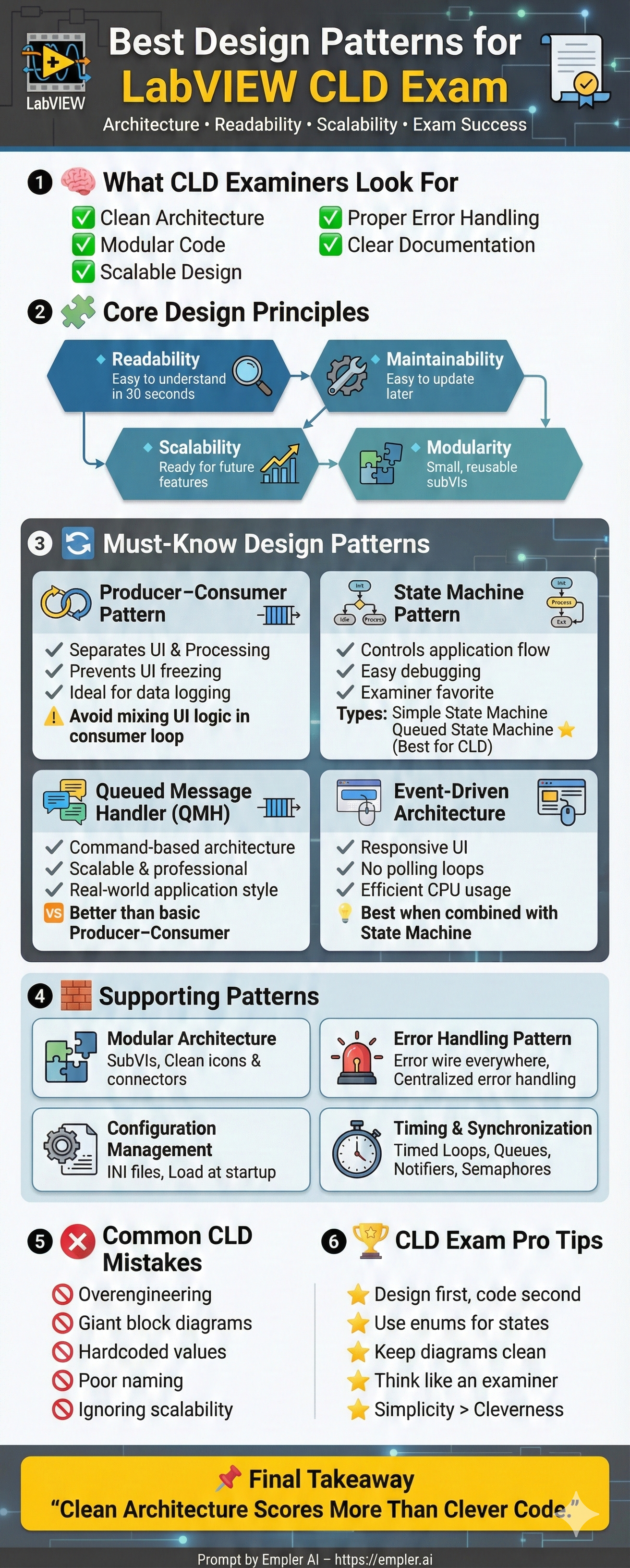
Understanding Design Patterns in LabVIEW
What Are Design Patterns?
In LabVIEW, design patterns are reusable templates for managing data flow, timing, user interactions, and error handling. They help you avoid ad-hoc wiring and create predictable structure.
How NI Evaluates Design in the CLD Exam
Examiners focus on:
- Clear, layered architecture
- Logical separation of concerns
- Consistent error handling
- Evidence of documentation and scalability
They value clean, modular structure over clever but unreadable wiring.
Core Principles You Must Follow
Readability and Maintainability
Chunk logic into digestible pieces, align structures, and label everything. The goal is for another developer to understand your flow in seconds.
Scalability and Modularity
Design as if tomorrow there will be a new requirement. Use reusable subVIs and avoid sprawling block diagrams.
Documentation and Clean Block Diagrams
Tip strips, descriptive VI names, and clean diagrams earn points in the documentation grading bucket. Don’t skip them because they feel "optional."
Top Design Patterns for LabVIEW CLD Exam
Understanding patterns is the quickest path to a professional architecture.
Producer–Consumer Design Pattern
Why Producer–Consumer Is a CLD Favorite
It isolates acquisition (producer) from processing (consumer), keeping the UI responsive and enabling deterministic workloads.
When to Use Producer–Consumer
- Automated instrumentation loops
- Real-time logging
- Scenarios where throughput must stay high under heavy loads
Common Mistakes to Avoid
- Mixing UI logic inside the consumer loop
- Forgetting to close queues during shutdown
- Handling exit conditions only in the producer, leaving consumers waiting
State Machine Design Pattern
Why State Machines Are Critical for CLD
They articulate system behavior in discrete, testable states. Examiners can follow the logic easily and spot missing transitions.
Types of State Machines
Simple State Machine
Best for small applications with linear or limited branching logic.
Queued State Machine
The CLD favorite. The queue allows adding commands dynamically and simplifies sequencing complex flows.
Best Practices for CLD Implementation
- Use enums to define states
- Keep the logic per case short
- Avoid hidden logic inside nested structures
Event-Driven Architecture
Importance of Event Structures
Event structures prevent inefficient polling and keep the UI reactive without wasting CPU cycles.
Event Handling in UI-Based Applications
All user interactions—buttons, value changes, menu items—should target event structures to keep logic centralized.
Combining Events with State Machines
Use events to trigger state transitions, maintaining separation between UI and processing logic.
Queued Message Handler (QMH)
What Is QMH?
QMH uses queues, routers, and workers to separate command parsing from execution and error handling.
Why Examiners Love QMH
It mirrors industrial practices: maintainable command routing, centralized error management, and flexible command handling.
QMH vs Producer–Consumer
QMH builds on producer–consumer by formalizing the commands and adding routers, making it smarter for complex specs.
Modular Architecture Pattern
Why Modularity Scores High
SubVIs reduce visual clutter, make testing easier, and promote reuse across projects.
How to Split Code into SubVIs
Break out repeated sequences, complex math, or state-handling logic into separate VIs with clear inputs/outputs.
Icon and Connector Pane Best Practices
Use clean icons, limited connectors, and descriptive tooltips so the diagram reads like documentation.
Error Handling Design Pattern
Proper Error Wire Usage
Never cut the error wire unless IntelliSense-driven reasons demand it. Let errors flow to a centralized handler.
Centralized Error Handling
A single error handler logs, reports, and gracefully shuts down loops, keeping the whole app predictable.
Error Logging Strategies
Log timestamps, states, and relevant parameters so you can diagnose issues quickly—even during the exam review.
Configuration Management Pattern
Using Configuration Files
Hardcoded values are a CLD red flag. Read configuration settings from external files to show flexibility.
Ini Files vs JSON
INI files are simple and exam-friendly; JSON works fine if you parse it safely.
Loading Configuration at Startup
Read the file once during initialization and store values in a central configuration VI.
Data Flow Optimization Patterns
Avoiding Race Conditions
Protect shared resources with queues and keep cross-loop communication predictable.
Using Shift Registers Effectively
Shift registers provide deterministic state storage without relying on flingy globals.
Managing Shared Resources
Favor queues, not global variables. Document any shared resource and guard it with semaphores or notifiers.
Timing and Synchronization Patterns
Using Timed Loops vs While Loops
Timed loops enforce deterministic timing and are preferred for hardware interactions.
Synchronization with Notifiers and Semaphores
Use these primitives when multiple loops need to coordinate without introducing race conditions.
Documentation and Style Guidelines
Block Diagram Cleanup
Align structures, maintain consistent spacing, and keep wires straight to make diagrams legible.
Front Panel Design Best Practices
Use grouped controls, meaningful colors, and readable fonts to give examiners confidence.
Following NI Style Guidelines
Stick to NI naming conventions, connector layouts, and file organization—they exist for a reason.
Common Design Pattern Mistakes in CLD Exam
Overengineering
Adding complexity to look "clever" backfires. Keep solutions as simple as the spec allows.
Ignoring Scalability
Designs that can’t handle extra requirements look brittle. Always leave room for growth.
Poor Naming Conventions
Clear VI names and control labels help examiners understand logic without guessing.
How to Practice Design Patterns for CLD
Mock Exam Practice
Simulate timed exams, practice with sample requirements, and respect the clock.
Time Management Strategies
Design first, code second, debug last. Avoid digging into implementation until the architecture is settled.
Reviewing Sample Architectures
Study high-scoring submissions to see how they apply patterns under exam constraints.
Final Tips to Maximize CLD Exam Score
Think Like an Examiner
Ask: Is everything readable, maintainable, and reusable?
Design First, Code Second
A disciplined design phase keeps the implementation clean and easier to debug.
Conclusion
Mastering state machines, producer–consumer/QMH, modular design, and documentation earns you credibility. The architecture carries the CLD exam more than clever one-offs.
FAQs
1. What design pattern is most important for LabVIEW CLD?
State machines and producer–consumer/QMH architectures top the list.
2. Can I pass CLD without using a state machine?
Technically yes, but your logic flow will look unclear and you risk losing significant points.
3. How much documentation is required in CLD?
Enough that another developer can understand your logic without guessing.
4. Should I focus more on functionality or architecture?
Architecture first—functionality flows from a solid design blueprint.
5. How long should I practice before attempting CLD?
Plan for 2–3 months of focused, timed practice on patterns and mock exams.