NI TestStand vs Custom LabVIEW Test Executive: Which One Should You Choose?
In the current landscape of rapid deployment and Industry 4.0, the decision between internal development and third-party procurement represents a critical pivot point in software architecture. This "Build vs. Buy" dilemma is particularly acute when scaling quality assurance infrastructure. Engineering leaders are constantly faced with the decision of whether to allocate high-value developer hours to constructing proprietary Test Management Software or to leverage existing commercial solutions.
The debate of NI TestStand vs Custom Testing frameworks is not merely a technical preference; it is a strategic business decision that impacts R&D budgets, time-to-market, and long-term operational resilience. While a bespoke build offers hyper-customization, it often introduces significant technical debt and long-term maintenance burdens. Conversely, integrating sophisticated Automated Test Systems from external vendors can accelerate deployment and provide immediate operational maturity, though it may require compromising on specific niche requirements.
The stakes are immense: an incorrect architectural choice can drain resources, delay product launches, and stifle innovation. Ultimately, the decision rests on whether an organization's competitive advantage lies in its underlying testing framework or in the speed and quality of its core product delivery.
Defining the Contenders: NI TestStand vs Custom Testing Frameworks
To make an informed decision, one must first understand the fundamental differences in abstraction and architecture between these two approaches.
The Role of NI TestStand
NI TestStand is a ready-to-run test executive software designed to organize, control, and execute automated prototype, validation, and production test systems. It functions primarily as a sophisticated sequencing engine, decoupling high-level test logic from the underlying code modules (written in LabVIEW, C#, C++, or Python). As a pre-built framework, it natively handles complex cross-cutting concerns such as report generation, database logging, user management, and parallel execution, allowing developers to focus strictly on individual test steps.
TestStand operates on a modular architecture. It does not perform the actual measurements; rather, it acts as the conductor of an orchestra, signaling when specific instruments (code modules) should play. This separation of concerns is vital for enterprise-level scalability, as it allows the test executive to remain static while individual test modules are updated or replaced.
The Custom LabVIEW Approach
In contrast, a Custom LabVIEW solution involves building a test executive framework from the ground up using G-code. While LabVIEW provides the powerful primitives necessary to create a sequencing engine—the logic that dictates the order of operations and handles state transitions—the developer is responsible for manually architecting every supporting feature.
In a custom build, the distinction between the "test" and the "sequencer" often blurs. The developer must engineer the user interface, the data management layer, the user authentication protocols, and the error handling mechanisms alongside the actual test code. While this offers maximum flexibility—allowing for a solution that fits the exact contours of a specific problem—it comes at the cost of significantly higher development overhead. In the NI TestStand vs Custom Testing equation, the custom route demands that you become a software architect first and a test engineer second.
The Financial Reality: Total Cost of Ownership (TCO)
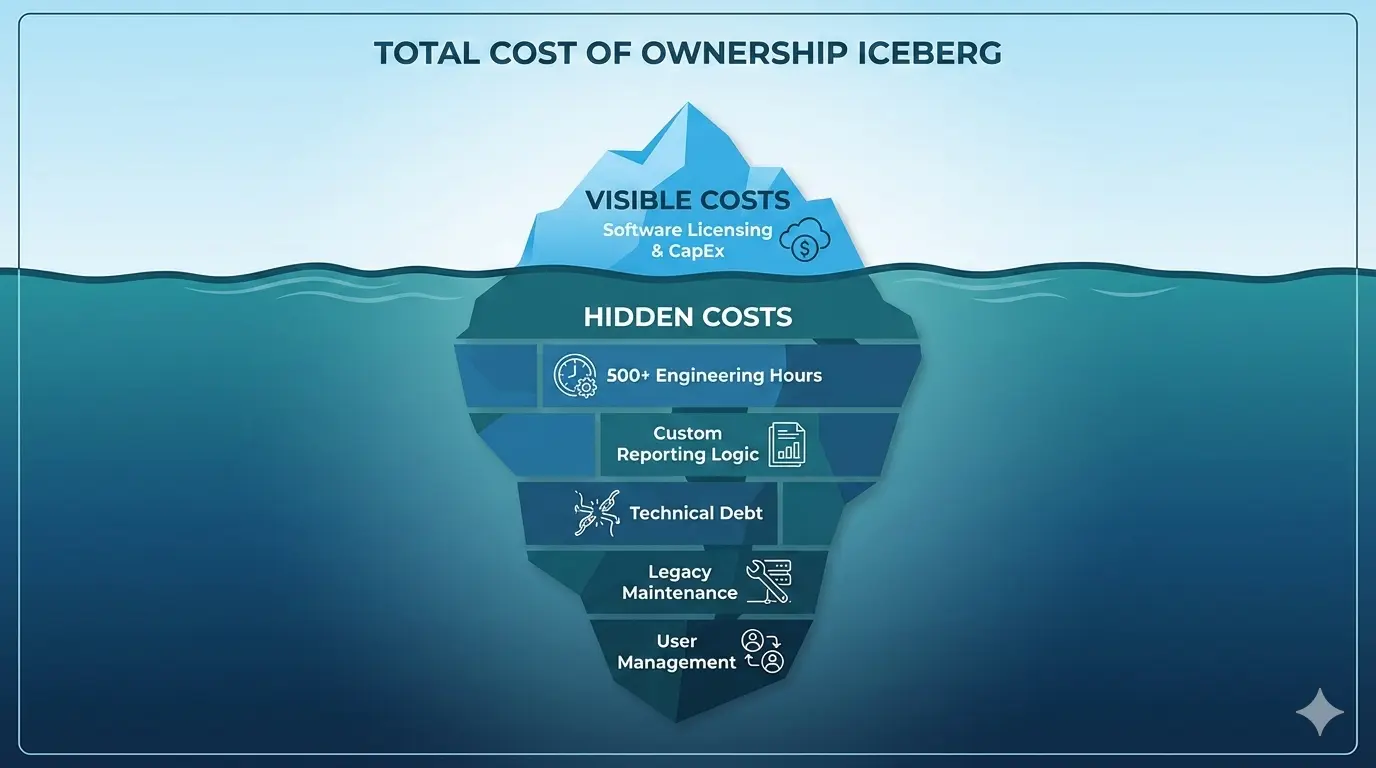
Software procurement evaluations often fixate on the sticker price—the upfront licensing or initial subscription fee. While these capital expenditures (CapEx) are easily quantified, they represent only the "tip of the iceberg" in a comprehensive financial analysis. A true cost comparison necessitates a shift in focus toward Total Cost of Ownership (TCO), which accounts for the holistic expenses incurred throughout a product's entire lifecycle.
The Hidden Labor Costs
Hidden labor costs are the primary drivers of TCO and frequently dwarf the original purchase price of commercial software. In a custom development scenario, these costs begin with implementation. Specialized internal teams must be assembled to define requirements, architect the solution, and write the core infrastructure code. This is not a one-time cost; as the test system goes live, the burden shifts to continuous operational maintenance (OpEx).
When analyzing NI TestStand vs Custom Testing costs, one must factor in:
- Documentation: Writing and maintaining manuals for a custom tool.
- Onboarding: Training new engineers on a proprietary framework that exists nowhere else in the industry.
- Debugging: Troubleshooting the framework itself, rather than just the device under test (DUT).
A high-maintenance legacy system or a low-cost custom alternative may feature attractive upfront savings yet incur massive technical debt. This debt manifests as high-salaried engineering hours spent on manual workarounds, security patching, or troubleshooting system failures. Conversely, a premium solution like TestStand, with a higher upfront cost, offers better out-of-the-box automation and managed services, effectively lowering the long-term labor requirement.
Opportunity Cost and Resource Misallocation
TCO also integrates the opportunity cost of downtime and resource misallocation. If internal talent is occupied with basic system upkeep—such as fixing a bug in the custom report generator or updating the user management database—they are diverted from innovation and revenue-generating projects.
Ultimately, an effective cost analysis demonstrates that a solution's value is not determined by its acquisition price, but by its ability to minimize cumulative human capital expenditure over time. Strategic decision-making requires looking past the invoice to evaluate the long-term drain on organizational resources. A lower upfront price is often a false economy if the hidden labor required to sustain the system exceeds the savings.
Accelerating Time-to-Market (TTM)
Development speed and Time-to-Market (TTM) are critical metrics that determine a product's competitive viability. In the race to launch new products, the test system is often the final gatekeeper. If the test system is not ready, the product cannot ship.
The Plumbing Trap
The primary bottleneck in accelerating TTM is often the "plumbing"—the underlying infrastructure required to support an application, such as server provisioning, database management, authentication protocols, and CI/CD pipelines.
In traditional 'plumbing' development within a custom framework, engineering teams spend a significant portion of their sprint cycles building and maintaining these foundational elements from scratch. While this provides granular control, it diverts focus from the product's unique value proposition. Every hour spent configuring a message queue, designing a login screen, or securing a network layer is an hour not spent on customer-facing features or validating the DUT. This approach leads to longer development cycles, delayed feedback loops, and a slower TTM, which can be fatal in fast-moving markets like consumer electronics or automotive.
The Plug-and-Play Advantage
Conversely, leveraging ready-to-use infrastructure shifts the burden of the "plumbing" to external providers. When evaluating NI TestStand vs Custom Testing, TestStand represents the "plug-and-play" model. By utilizing pre-integrated solutions for result processing, parallel threading, and instrument management, developers can leapfrog the setup phase.
The impact on TTM is transformative. Instead of months spent on infrastructure, teams can move from concept to deployment in weeks. This agility allows for rapid iteration based on real-world usage, ensuring the product evolves alongside market demands. Ultimately, choosing ready-to-use infrastructure over manual plumbing minimizes technical debt and maximizes the speed at which value is delivered to the end-user.
Scalability and Parallel Execution
One of the most complex challenges in test engineering is moving from testing one device at a time to testing many simultaneously (parallelism). This is where the divergence between NI TestStand vs Custom Testing becomes most apparent.
Native Parallelism in TestStand
NI TestStand is engineered for high-throughput automated testing, providing a modular framework that separates test logic from execution management to ensure seamless scalability. Central to this capability is its native support for multi-threaded execution through standardized process models.
Native parallelism in TestStand enables the simultaneous execution of multiple test sockets. Each socket runs in its own independent thread, managed automatically by the TestStand engine. This architecture ensures that a failure or delay in one test socket does not impede the progress of others. To manage hardware constraints in these parallel environments, TestStand provides built-in synchronization primitives—such as Mutexes, Semaphores, and Queues. These tools allow multiple threads to safely share instruments or power supplies without resource contention, maximizing instrument utilization and reducing idle time.
The Batch Process Model
The Batch Process Model is a specialized subset of parallelism designed for testing groups of Units Under Test (UUTs) that share a common testing environment or fixture. While the standard Parallel model treats each socket as a discrete entity, the Batch model introduces "Batch Synchronization." This feature allows developers to define synchronized sections where all UUTs must reach a specific point before proceeding. This is essential for scenarios such as environmental chamber testing, where all units must be present for a thermal soak, or for high-speed digital tests where a shared trigger initiates a measurement across multiple boards simultaneously.
By leveraging these features, TestStand allows for horizontal scaling. A developer can increase the number of active test sockets via configuration settings rather than rewriting the test sequence. This flexibility ensures that as production demands grow, the test system can scale to meet higher volume requirements while maintaining consistent data reporting and error handling across all execution threads.
Data Integrity and Reporting Architecture
In the era of Big Data, a test station is only as good as the data it produces. The architecture of data handling differs significantly between commercial and custom solutions.
Standardization via ATML
The NI TestStand architecture utilizes the Automatic Test Markup Language (ATML) standard, strictly adhering to IEEE 1671, to ensure seamless data exchange and interoperability across testing platforms. By employing ATML, the framework generates standardized XML-based reports that encapsulate test descriptions, execution results, and diagnostic information. This standardized format facilitates universal compatibility with third-party analysis tools and ensures that test data remains vendor-neutral and portable throughout the product lifecycle.
Comprehensive Database Integration
To eliminate manual entry errors and optimize throughput, the system implements comprehensive database logging automation. As test sequences execute, the data acquisition layer triggers asynchronous processes that stream telemetry and pass/fail metrics directly into a centralized relational database management system (RDBMS) such as Oracle, MySQL, or SQL Server. This automation pipeline is governed by a robust ETL (Extract, Transform, Load) workflow that validates incoming ATML packets against predefined schemas before ingestion.
Advanced triggers and stored procedures automate the indexing of critical performance indicators, enabling real-time dashboarding and trend analysis. The integration of automated logging ensures high data integrity by maintaining a comprehensive audit trail with millisecond-precision timestamps. Furthermore, the database architecture supports scalable storage solutions, allowing for the secure archival of historical datasets while maintaining high-speed query performance for regression testing and predictive maintenance modeling. This cohesive approach to data management transforms raw test outputs into actionable intelligence.
The User Experience: Interface and Usability
The separation of the test engine from the user interface (UI) is a hallmark of robust software design, yet it is often overlooked in custom builds.
Decoupling UI from Execution
TestStand's architecture decouples the execution engine from the user interface, providing significant UI flexibility. This separation allows developers to present complex automated test sequences through simplified, role-specific interfaces, shielding operators from underlying complexity while providing engineers with granular diagnostic tools. In a custom LabVIEW application, the UI and the execution logic are often tightly coupled, making it difficult to modify one without breaking the other.
The "Middle Ground" Strategy
While National Instruments provides pre-built Operator Interfaces and high-level UI Controls (ActiveX/.NET), many developers opt for the "middle ground" offered by the TestStand API. This approach involves building a custom UI that interacts directly with the TestStand Engine rather than relying solely on pre-packaged visual components.
By utilizing the API, developers can create lightweight, responsive interfaces in environments like C#, LabVIEW, or Python that handle sequence invocation, variable manipulation, and event synchronization programmatically. This strikes a balance between rapid development and total customization. It avoids the visual and functional constraints of standard controls—such as the default ExecutionView—while maintaining the robust functionality of the engine. Developers can parse sequence data to display only critical metrics in a bespoke dashboard, which is ideal for high-throughput manufacturing or applications requiring a specific corporate brand identity that standard TestStand controls cannot easily accommodate.
Workforce Resilience and Standardization
One of the most overlooked aspects of the NI TestStand vs Custom Testing debate is the human element. How does the choice of software affect the engineering team's resilience?
Mitigating "Hero Dependency"
Hero dependency occurs when critical operational knowledge is siloed within specific individuals, creating high-impact single points of failure. In custom frameworks, the original architect often becomes the only person who understands the code. If that person leaves, the organization is left with a "black box" that no one dares to touch.
To mitigate this risk, organizations must pivot from individual-centric workflows to process-centric models through rigorous standardization. TestStand provides an industry-standard framework. If an organization hires a TestStand developer, they already know the architecture, the process models, and the debugging tools.
Knowledge Transfer and Scalability
Standardization serves as the foundation for workforce resilience. By decomposing complex, expert-led tasks into Standard Operating Procedures (SOPs) and uniform toolsets, organizations eliminate the mystery of specialized roles. This ensures that technical execution remains consistent regardless of the specific personnel involved, effectively transforming tribal knowledge into institutional capital.
Knowledge transfer must be formalized to support this transition. Structured cross-training programs and centralized, searchable documentation repositories ensure that expertise is disseminated across the team rather than hoarded. Ultimately, these measures drive workforce scalability. When processes are standardized on a commercial platform like TestStand, the organization can onboard new talent rapidly and expand capacity without a proportional increase in operational risk.
When Custom is King: Real-Time and FPGA Requirements
Despite the advantages of TestStand, there are scenarios where a custom LabVIEW approach is not just a preference, but a technical necessity. This typically involves deterministic performance.
LabVIEW Real-Time and FPGA modules provide deterministic performance in scenarios where microsecond-level precision and hardware-level reliability are mandatory—requirements that TestStand, running on a non-deterministic Windows OS, cannot satisfy.
High-Speed Closed-Loop Control
In Hardware-in-the-Loop (HIL) testing, such as simulating an Engine Control Unit (ECU), the system must respond to sensor inputs with calculated actuator outputs in sub-millisecond cycles. LabVIEW FPGA can execute these control loops at MHz rates with nanosecond jitter. TestStand's sequential execution and dependency on the Windows scheduler introduce millisecond-level latencies that would destabilize the simulation.
Critical Safety Interlocks
For high-power applications like battery cell cycling or aerospace component testing, safety interlocks must trigger instantaneously if parameters exceed limits. An FPGA can implement hardware-logic gates that respond to over-voltage or over-temperature conditions in nanoseconds, independent of the CPU state. TestStand relies on software-level polling, which can be interrupted by OS background tasks, potentially delaying a shutdown command during a critical failure.
Protocol Emulation and Bit-Banging
Testing custom or non-standard digital protocols requires precise control over clock edges and data alignment. LabVIEW FPGA allows for deterministic "bit-banging" and hardware-timed synchronization. TestStand is designed for high-level command sequences; it lacks the temporal granularity to manage the physical layer of communication without experiencing timing violations.
Decision Matrix: NI TestStand vs. Custom Framework
To summarize the NI TestStand vs Custom Testing comparison, refer to the following matrix.
| Evaluation Factor | NI TestStand | Custom Framework (Python, C#, LabVIEW) |
|---|---|---|
| Development Velocity | Rapid: Pre-built sequencing, UI, and reporting. | Slow: Requires architecting core infrastructure. |
| Upfront Cost | High: Per-seat and deployment licensing fees. | Low: Minimal software costs; high labor hours. |
| Lifecycle Support | Standardized: Vendor-backed updates and patches. | High Risk: Dependent on original developers. |
| Feature Complexity | Native: Built-in parallelism and DB logging. | Manual: Must build synchronization logic. |
| Flexibility | Moderate: Constrained by framework rules. | Unlimited: Complete control over every byte. |
Implementation Checklist
Evaluate your project against these five criteria to determine the best fit:
- Parallelism & Resource Management: Do you need to test multiple Units Under Test (UUTs) simultaneously with complex instrument arbitration? (If Yes: TestStand)
- Reporting & Compliance: Is immediate integration with SQL databases, ATML, or XML required for regulatory audit trails (e.g., Aerospace, MedTech)? (If Yes: TestStand)
- Team Composition: Does your team consist of test engineers focused on measurements, or software architects capable of maintaining a proprietary engine? (Engineers: TestStand; Architects: Custom)
- Operational Scale: Will the solution be deployed across multiple global sites requiring a unified operator interface and standardized process model? (If Yes: TestStand)
- Hardware Specificity: Does the test require deep, non-standard integration with proprietary OS-level drivers or niche embedded protocols? (If Yes: Custom)
Strategic Recommendation
Choose NI TestStand for high-volume production (Automotive, Defense) where standardization, parallel execution, and long-term vendor support are critical. Opt for a Custom Framework for specialized R&D, silicon validation, or startups where capital is limited but internal software engineering bandwidth is high.
Future-Proofing Your Test Strategy
Future-proofing test strategies requires a fundamental shift from reactive bug hunting to proactive quality engineering. As systems grow in complexity, long-term lifecycle management hinges on the seamless integration of automated frameworks that are both modular and scalable. This necessitates the adoption of AI-driven analytics to predict potential failure points and self-healing scripts to minimize the accumulation of technical debt. Organizations must move beyond static test plans, embracing a culture of continuous improvement where testing evolves in lockstep with software architecture.
By prioritizing interoperability and maintaining a robust data-driven feedback loop, teams can ensure that their verification processes remain resilient against emerging technologies and shifting market demands. Ultimately, the sustainability of a testing lifecycle is defined by its ability to balance immediate delivery pressures with the long-term integrity of the codebase. A future-ready strategy is not a fixed destination but a dynamic process of constant adaptation, ensuring that quality remains a constant throughout the entire product evolution.
Frequently Asked Questions (FAQ)
LabVIEW Licensing
Q: What is the difference between the LabVIEW Community Edition and the Professional Edition?
The LabVIEW Community Edition is free for personal, non-commercial, and non-academic use. It includes the same features as the Professional Edition, including the Application Builder for creating executables. However, any project intended for commercial gain or performed by a business entity requires a paid Professional or Base subscription.
Q: Can I still purchase a perpetual license for LabVIEW?
As of 2022, NI (National Instruments) transitioned primarily to a subscription-based model. While legacy perpetual licenses remain valid for the version purchased, new seats and upgrades are generally restricted to annual subscriptions. Limited exceptions may exist for specific enterprise agreements, but most individual and small-team users must use the subscription model.
Q: What happens to my code if my subscription expires?
If a subscription expires, you lose the right to use the LabVIEW Development Environment. However, any compiled executables (EXE) or installers created while the license was active will continue to function indefinitely. You will not be able to edit or recompile the source code until the subscription is renewed.
Q: Does LabVIEW Community Edition require an internet connection?
Yes, the Community Edition requires periodic activation through the NI License Manager. While it can run offline for short periods, it must "check in" with NI servers every few weeks to verify the license status.
Python Integration with TestStand and LabVIEW
Q: What is the most efficient way to call Python code from LabVIEW?
The native Python Node (introduced in LabVIEW 2018) is the standard method for calling Python scripts. It allows you to call specific functions within a .py file, pass data in/out, and maintain a session. For legacy systems or complex shell-dependent scripts, System Exec.vi is an alternative, though it lacks the memory efficiency of the Python Node.
Q: Which versions of Python are supported?
Support depends on your LabVIEW version. Generally:
- LabVIEW 2018-2020: Supports Python 2.7, 3.6, and 3.7.
- LabVIEW 2021-2023: Supports Python 3.7, 3.8, and 3.9.
- LabVIEW 2024+: Adds support for Python 3.10 and 3.11. Note that the bitness must match; 64-bit LabVIEW requires a 64-bit Python installation.
Q: How do I handle Python Virtual Environments (venv) or Conda?
The LabVIEW Python Node requires a path to the Python executable. To use a virtual environment:
- Point the "Python Path" in the Open Python Session VI to the python.exe located inside your environment's Scripts (Windows) or bin (Linux) folder.
- Alternatively, use a batch file or the System Exec.vi to activate the environment before running the script.
Q: Why am I receiving "Error 1667: Python session is invalid"?
This error typically occurs if there is a version mismatch between the Python Node configuration and the installed Python interpreter. Common causes include:
- Using a 32-bit Python install with 64-bit LabVIEW.
- The Python DLL is not in the system PATH.
- Attempting to use a Python version newer than what your LabVIEW version supports.
Q: How are complex data types (like Clusters or DataFrames) handled?
The Python Node natively supports basic types: integers, floats, booleans, strings, and arrays of these types.
- Clusters: Usually passed as JSON strings. Use LabVIEW's "Flatten to JSON" and Python's json.loads() to reconstruct the data.
- DataFrames: Convert to a 2D array or a CSV-formatted string in Python before passing it back to LabVIEW.
Q: Can I debug my Python code while it is being called by LabVIEW?
Direct step-through debugging is not supported within the LabVIEW IDE. To debug, it is recommended to use logging (writing to a text file) within your Python script or to use a "Remote Debugger" library like debugpy to attach an external IDE like VS Code to the running Python process spawned by LabVIEW.